

Description
Download W Box VMS HD APK – Mobile Surveillance App, IP Camera Monitoring, DVR Monitoring, Real-Time Video Preview
Overview
W Box VMS HD is a mobile surveillance application developed by Honeywell International Inc., designed to provide remote monitoring capabilities for W Box IP network cameras and a range of DVR series devices. The software serves as a client-side tool for users who require real-time access to surveillance footage from multiple camera sources, enabling them to monitor security conditions from any location with an internet connection. It is particularly suited for security personnel, facility managers, and property owners who rely on continuous monitoring across residential, commercial, or industrial environments.
The application supports a broad lineup of W Box devices, including models such as 0E-4500GMD, 0E-81TMD, 0E-161TMD, 0E-41T1UD, 0E-82T1UD, and 0E-162T1UD, ensuring compatibility with both standalone IP cameras and integrated DVR systems. Its primary function is to deliver a unified interface for viewing, managing, and configuring surveillance devices remotely. By enabling real-time video preview across up to 16 channels, the app enhances situational awareness and allows for immediate response to potential security threats. The developer did not provide additional system requirements, and no specific performance benchmarks were listed.
Key Features & Capabilities
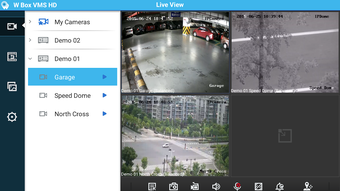
- Real-time Video Preview (Up to 16 Channels): Users can view live video feeds from multiple cameras simultaneously, offering a comprehensive overview of monitored areas. This feature is ideal for environments requiring constant visual oversight, such as retail stores, warehouses, or multi-unit residential buildings.
- Preset Activation and Configuration: The app allows users to set and manage camera presets, enabling quick navigation to specific viewing angles. This functionality supports efficient monitoring by reducing the time needed to reposition cameras manually.
- Brightness Calibration: Users can adjust image brightness to optimize visibility under varying lighting conditions. This ensures consistent video quality regardless of ambient light changes during day or night operations.
- Screenshot Capture: The application supports snapshot functionality, allowing users to capture still images from live footage. These images can be saved locally or shared for incident documentation or reporting purposes.
- Device Profile Management: The app enables users to manage up to 256 device profiles, including adding, deleting, and modifying configurations. This scalability supports large-scale surveillance deployments across multiple sites or locations.
These features collectively enhance the usability and flexibility of the application, making it suitable for both small-scale and enterprise-level security monitoring. The ability to manage a large number of devices from a single mobile interface streamlines operations and reduces the need for multiple tools.
User Interface, Workflow & Performance
The user interface of W Box VMS HD is designed for intuitive navigation, with a layout optimized for mobile touchscreens. Core functions such as video playback, preset selection, and device management are accessible through clearly labeled icons and menus. The workflow follows a logical sequence: device connection, channel selection, and real-time viewing, with minimal steps required to initiate monitoring.
Navigation is streamlined to support quick access to frequently used features, such as switching between camera views or capturing snapshots. The application’s performance is expected to be stable under normal network conditions, though exact resource usage details were not specified by the developer. The developer did not provide information on CPU or RAM consumption, nor did they include performance benchmarks. General software behavior patterns suggest that the app operates efficiently on modern smartphones and tablets with stable internet connectivity.
Compatibility & System Requirements
W Box VMS HD is available for both Android and iOS platforms, ensuring broad accessibility across mobile devices. The current version is 2.3.2, with a file size of 13.2 MB, indicating a lightweight installation. The application is designed to run on devices supporting the latest versions of Android and iOS, though specific minimum OS versions were not listed by the developer.
Compatibility information was partially provided, with no explicit mention of hardware requirements such as processor speed, RAM, or storage capacity. The developer did not specify whether the app requires a dedicated network configuration or if it supports Wi-Fi, cellular, or both. Exact performance details were not specified, and no information was shared regarding background operation or battery impact during extended use.
Pros and Cons
Pros
- Supports real-time video preview from up to 16 camera channels
- Offers device profile management for up to 256 surveillance systems
- Includes brightness calibration for improved image quality
- Enables snapshot capture for incident documentation
- Designed for seamless integration with W Box IP cameras and DVR series
Cons
- Exact system requirements were not listed by the developer
- Performance details such as CPU or RAM usage were not provided
- Compatibility with older Android or iOS versions is unclear
- No information on background operation or battery consumption
- Limited details on network bandwidth requirements
FAQ Section
Is W Box VMS HD compatible with all W Box IP cameras?
The application is designed to support the full line of W Box IP network cameras and DVR series. Specific compatibility with individual models may depend on firmware and network configuration.
Can I use W Box VMS HD offline?
The app requires an active internet connection to access live video feeds and manage devices. Offline functionality is not supported.
Is the app free to download and use?
Yes, W Box VMS HD is available at no cost. The developer has not indicated any in-app purchases or subscription fees.
How many devices can I manage with W Box VMS HD?
The application supports the management of up to 256 device profiles, allowing users to monitor multiple surveillance systems from a single interface.
Does W Box VMS HD require a specific network setup?
While the app is designed to work with standard network configurations, optimal performance may depend on stable internet connectivity and proper device setup on the local network.
Final Thoughts
W Box VMS HD delivers a robust and scalable solution for remote surveillance, combining real-time video access, device management, and image optimization in a single mobile application. Its support for a wide range of W Box devices and ability to handle up to 256 profiles make it a practical choice for both small businesses and larger security operations. The inclusion of features like preset management and brightness calibration enhances usability and adaptability across diverse environments.
Although detailed system requirements and performance data are not publicly available, the app’s lightweight size and mobile-first design suggest efficient operation on modern devices. For users already invested in the W Box ecosystem, this tool offers a seamless extension of their surveillance infrastructure.
Download W Box VMS HD now
Guides & Tutorials for Box VMS HD APK
How to install Box VMS HD APK
- Click the Preview / Download button above.
- Once redirected, accept the terms and click Install.
- Wait for the Box VMS HD APK download to finish on your device.
How to use Box VMS HD APK
This software is primarily used for its core features described above. Open the app after installation to explore its capabilities.
User Reviews for Box VMS HD APK 0
No reviews found





